
NetBox vs Nautobot vs Infrahub: Choosing Your Network Source of Truth
Table of Contents
You’ve automated device configuration. Your CI/CD pipeline is humming. Then your automation breaks because someone updated the IPAM spreadsheet but forgot to tell anyone. Or worse, nobody knows which spreadsheet is current.
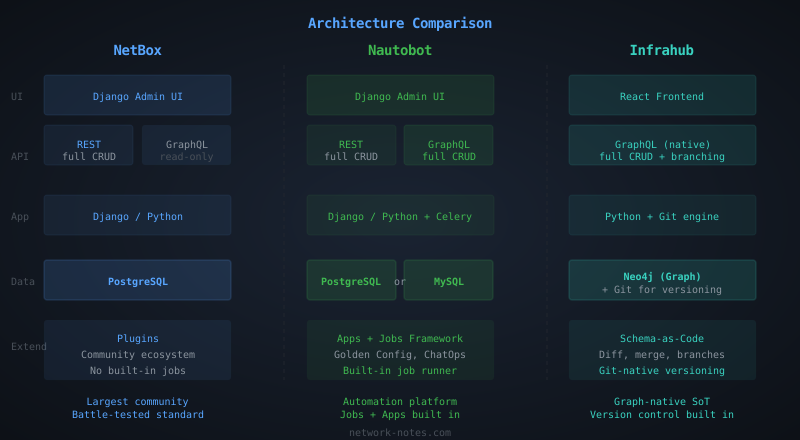
Before you can reliably automate anything, you need a single source of truth for your network infrastructure. Three platforms have emerged as leaders: NetBox, Nautobot, and Infrahub. Each takes a different approach to the same problem.
Author’s Note: I have clear biases here. I first used NetBox in 2018, worked at Network to Code for four years (including during the Nautobot fork), and served as Director of Product at OpsMill during Infrahub’s development. I’ve tried to be fair to all three, but you should test them yourself. This comparison reflects what I’ve seen firsthand — including where each platform frustrated me.
All information is current as of early 2026. These projects move fast — check their changelogs before making decisions.
Quick Comparison
| Feature | NetBox | Nautobot | Infrahub |
|---|---|---|---|
| Database | PostgreSQL | PostgreSQL or MySQL | Neo4j (graph) |
| API | REST + GraphQL (read-only) | REST + GraphQL | GraphQL (REST for admin only) |
| Deployment | Minimal (Django) | Minimal (Django) | Moderate (Neo4j) |
| Version Control | Change logging | Change logging | Git-native branching |
| Automation | External tools | Built-in Jobs | CI/CD integration |
| Schema Changes | Migrations required | Migrations required | Dynamic, no migrations |
| Scale | 10K+ devices | 10K+ devices | Newer; scales well for complex topologies |
| Learning Curve | Low | Moderate | Moderate-High |
| Ecosystem | Largest (~18.6K GitHub ⭐, as of March 2026) | Growing (~1.4K ⭐) | Emerging (~436 ⭐) |
| Support | Community + NetBox Labs | Community + NTC | Community + OpsMill |
| Multi-tenancy | Built-in tenancy model | Built-in tenancy model | Schema-defined |
| Licensing | Apache 2.0 | Apache 2.0 | Apache 2.0 |
NetBox
NetBox started as an internal tool at DigitalOcean’s network engineering team. It’s now maintained by NetBox Labs and has the largest install base of any network source of truth platform (~18.6K GitHub stars as of March 2026). It’s well-documented, has an active community, and runs as a standard Django app — you can have it up on a single VM in minutes.
The Plugin Ecosystem
NetBox’s plugin system is what keeps it dominant despite newer competitors. With dozens of community plugins available — and more appearing regularly — you can extend NetBox without writing custom code. Need BGP peering management? There’s a plugin. Topology visualization? Plugin. Device lifecycle tracking? Plugin.
Many teams don’t have the engineering bandwidth to build custom features. With NetBox, someone has probably already solved your problem and published it. I’ve seen teams go from “we need feature X” to “it’s in production” in an afternoon just by installing a community plugin.
The tradeoff: plugins depend on NetBox’s release cycle. Major version upgrades can break plugins, and you’re at the mercy of plugin maintainers to update. Plan for this during upgrades.
Limitations
- Schema rigidity: Adding custom data models historically required Python code and migrations. The Custom Objects plugin (GA as of October 2025) now allows no-code model extensions, though it’s a NetBox Labs plugin rather than a core feature.
- External automation: No built-in job runs, requires external orchestration
- Read-only GraphQL: GraphQL API is available but read-only; mutations require REST
When to Use NetBox
NetBox is ideal when you need a proven, stable platform with strong IPAM/DCIM out of the box, a large plugin ecosystem, and REST API compatibility with existing tools.
Don’t choose NetBox if: You need built-in automation workflows, version control for data changes, or frequently modify your data schema.
My take: NetBox is where I started in 2018, and I had a working IPAM to compare against our home-grown solution within a day. The community is massive and helpful. But I kept hitting the same wall — every custom data model meant writing a plugin and managing migrations. Custom Objects is a step toward fixing that, though it’s still a plugin rather than core behavior. For teams that just need IPAM and DCIM without much customization, it works great. Once your requirements get more complex, you’ll start looking elsewhere.
Nautobot
Nautobot is a fork of NetBox created by Network to Code in 2021. The fork wasn’t a rejection of NetBox, but a response to customer requirements that diverged from NetBox’s roadmap — customers needed support with SLAs, long-term support versions for enterprises that couldn’t upgrade rapidly, and a platform that could do more than just serve data. Nautobot adds enterprise features like advanced RBAC and SSO, a more powerful plugin system (called “Apps”), Git repository sync for automation logic, and support for both PostgreSQL and MySQL as database backends.
The Jobs Framework
What sets Nautobot apart is its Jobs framework. Jobs are Python scripts that run within Nautobot itself, with full access to the database and the ability to interact with external systems. Unlike external automation tools that query the source of truth, Jobs make the source of truth an active participant in automation.
Real-world use cases include:
- Pre-change validation: Before deploying a configuration change, a Job can verify that IP addresses don’t conflict, VLANs exist, and circuits have capacity
- Device onboarding: A Job can discover a new device, pull its configuration, create the device record, populate interfaces, and assign IP addresses - all from within Nautobot
- Compliance reporting: Jobs can audit existing devices against naming standards, configuration templates, or security policies and flag violations
- Self-service portals: Jobs can expose network operations to other teams through a web UI, like provisioning a new VLAN or circuit
Jobs can be stored in Git repositories and synchronized into Nautobot. They can run on-demand, on schedules, or be triggered by webhooks. The framework includes approval workflows, so changes can require manager approval before running.
Limitations
- Learning curve: Jobs framework and GraphQL add complexity
- Smaller ecosystem: Fewer apps than NetBox plugins (though growing rapidly)
- Schema rigidity: Like NetBox, schema changes require migrations
When to Use Nautobot
Nautobot makes sense when you need built-in automation workflows without external orchestration, enterprise features like RBAC and SSO, professional support with SLAs, or a platform that can grow with complex automation needs.
Don’t choose Nautobot if: You want the largest plugin ecosystem, need the simplest possible deployment, or don’t need built-in automation (NetBox may be sufficient).
My take: If you need a traditional source of truth that actually participates in your automation, Nautobot is the stronger choice over NetBox. The Jobs framework is the real differentiator — I watched customers go from “we need six external tools to onboard a device” to “one button in Nautobot.” Yes, it’s more complex than NetBox, but that complexity exists because it’s solving harder problems. Teams that commit to it get a platform that grows with them.
Infrahub
Infrahub is the newest entrant, launched in beta in May 2024 and reaching GA with version 1.0 in November 2024. The founding team, having worked extensively with both NetBox and Nautobot, kept hitting the same walls: rigid schemas requiring database migrations, no built-in versioning for data, and constant tradeoffs between extensibility and maintainability. Infrahub takes a different architectural approach — a Neo4j graph database with GraphQL API, built-in version control, and CI/CD integration. It treats infrastructure data like code. It can also sync data from multiple sources (NetBox, CMDBs, etc.), acting as an aggregation layer.
The Graph Database and Version Control
Graph databases natively model relationships between objects, which is exactly what infrastructure is — a web of interconnected devices, interfaces, circuits, and services. In a traditional SQL database, you model relationships through foreign keys and join tables. In a graph database, relationships are first-class citizens.
This matters when you’re asking questions like “show me all devices that would be affected if this circuit goes down” or “what services depend on this interface?” Graph databases traverse these relationships much faster than SQL joins for deep traversals.
Infrahub’s other signature feature is Git-like version control for all data. You can create a branch, make changes to device configurations or IP assignments, run validation checks in CI/CD, have peers review the changes, and merge them to production. If something breaks, you can roll back to any previous state.
This solves a real problem: how do you safely test changes to your source of truth? Your automation can render configurations from a branch, deploy to test devices, validate the results, and only then merge to production. CI/CD checks catch errors like IP conflicts, missing VLANs, or invalid device types before they hit production.
Limitations
- No REST API for data: All data operations are GraphQL; REST endpoints exist only for admin tasks
- Smaller ecosystem: Newer platform with fewer third-party integrations than NetBox/Nautobot
- Deployment complexity: Neo4j adds operational overhead vs PostgreSQL
- Learning curve: Git workflows and GraphQL require team training
When to Use Infrahub
Infrahub is the right choice when you need Git-style workflows for infrastructure data, complex relationship modeling, CI/CD integration for data validation, flexible schemas without migrations, or a platform that unifies data from multiple sources.
Don’t choose Infrahub if: You need REST API compatibility, want the simplest deployment, require a mature plugin ecosystem, or aren’t ready to adopt Git-based workflows for data.
My take: Infrahub is where this space is heading. The version control concept solves a real problem — I’ve seen too many outages caused by untested source of truth changes, and neither NetBox nor Nautobot has an answer for that. The learning curve is steep (GraphQL, Neo4j, Git workflows for data), but teams that invest in it — especially at scale or in complex environments — get capabilities the other two can’t match. If your team already thinks in Git and CI/CD, it clicks fast.
Deployment and Operations
NetBox
- Deployment: Single VM or Docker Compose, PostgreSQL database. NetBox Cloud is also available as a managed option with a free tier.
- Resources: 4 GB RAM minimum (8 GB recommended for production)
- Backup: Standard PostgreSQL backup strategies
- Time to running: Minutes with Docker Compose; a few hours for production hardening
Nautobot
- Deployment: Single VM or Docker Compose, PostgreSQL database
- Resources: 4-8 GB RAM (Jobs and Apps can be resource-intensive)
- Backup: Standard PostgreSQL backup strategies
- Time to running: Minutes with Docker Compose; additional time for Apps and Jobs configuration
Infrahub
- Deployment: Docker Compose or Kubernetes, requires Neo4j
- Resources: Minimum 6 cores / 12 GB RAM; recommended 8 cores / 16 GB RAM
- Backup: Neo4j backup strategies (different from PostgreSQL)
- Time to running: Minutes with Docker (single curl command); additional time for schema design
Integration Ecosystem
Automation Tools
- Ansible: NetBox and Nautobot have native dynamic inventory. Infrahub has an official Ansible collection with dynamic inventory support.
- Terraform: Providers available for NetBox and Nautobot (Nautobot’s is in beta). Infrahub uses GraphQL-based integrations rather than a dedicated Terraform provider.
- Nornir: All three can serve as inventory sources with appropriate plugins
Third-Party Integrations
- NetBox: Largest ecosystem - monitoring tools, ticketing systems, CI/CD platforms
- Nautobot: Growing ecosystem, most NetBox integrations can be adapted
- Infrahub: Emerging ecosystem, focus on GitOps tooling (GitHub Actions, GitLab CI)
Migration Considerations
NetBox to Nautobot
Relatively straightforward due to shared heritage. Nautobot provides migration tools and maintains API compatibility for most operations. In my experience, expect 1–2 weeks for migration and testing depending on customizations.
Key considerations:
- Custom scripts may need updates for GraphQL
- Plugins need to be replaced with Nautobot Apps
- Jobs framework requires new automation patterns
NetBox/Nautobot to Infrahub
More involved due to architectural differences. Infrahub can sync data from NetBox/Nautobot, allowing gradual migration or hybrid operation where Infrahub aggregates data from existing systems.
Key considerations:
- REST API clients need rewriting for GraphQL
- Schema mapping requires planning
- Team training on Git workflows for data
- Plan for 1–3 months for full migration in my experience
Starting Fresh
If you’re not migrating, your choice depends more on team workflows and future needs than migration complexity. Start with a proof-of-concept using real data from your environment.
The Bottom Line
Pick the one that matches where your team is today:
- NetBox if you need IPAM/DCIM fast, your team isn’t writing much custom code, and you want the largest community and plugin ecosystem behind you.
- Nautobot if your source of truth needs to actively participate in automation — running Jobs, enforcing workflows, integrating with Git repos — and you want enterprise support options.
- Infrahub if you’re already thinking in Git and CI/CD, need version control for infrastructure data, or have complex relationship-heavy topologies that benefit from a graph database.
All three are open source, actively maintained, and production-ready. Deploy each in a test environment with a subset of your real data and see which fits.