
Stop Picking Tools, Start Picking Functions: The NAF Framework
Table of Contents
The Tool-First Trap
Every network automation conversation I’ve been part of starts the same way: “Should we use Ansible or Nornir? NetBox or Nautobot? Terraform or Pulumi?”
These are the wrong first questions. They’re implementation details masquerading as architecture decisions. You end up picking a tool, building around it, then discovering six months later that you’ve solved 30% of the problem and created three new ones.
The result is what Damien Garros describes as the “Frankenstack”: a pile of point tools stitched together with glue scripts, each solving a narrow problem but none composing into a coherent system. I built these early in my career. I spent years at Network to Code and OpsMill helping customers untangle them. You’ve probably built or inherited one yourself. They work until they don’t, and when they break, nobody can reason about the whole thing because there was never a whole thing to reason about.
What’s missing isn’t better tools. It’s a shared vocabulary for the functions your automation system needs to perform. The NAF Reference Framework is a good start.
The Building Blocks
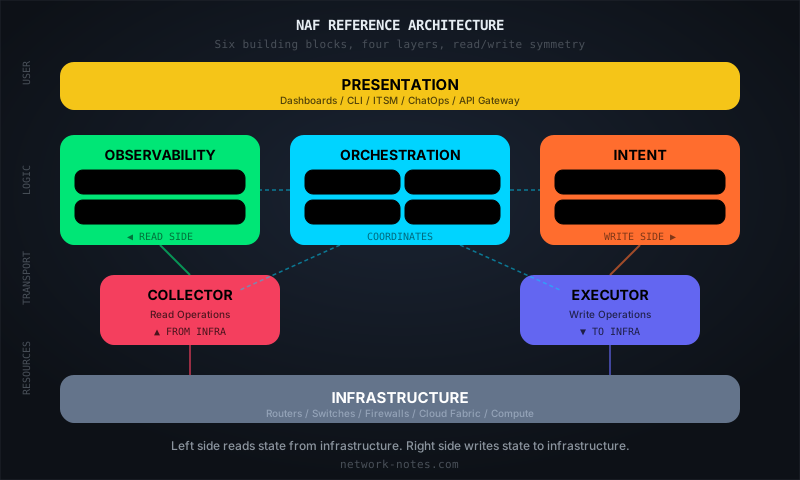
The Network Automation Forum (NAF) published a reference architecture that breaks network automation into six functional building blocks, plus the network infrastructure itself as a seventh visual layer that everything acts upon. It’s not a product. It’s not a standard. It’s a blueprint, a way to think about what your automation system needs to do before you decide how to do it.
The six functional blocks answer four questions:
| Question | Building Block(s) |
|---|---|
| What do I want the network to look like? | Intent |
| What does the network actually look like? | Observability |
| How do I read from and write to the network? | Collector (read) / Executor (write) |
| How do I coordinate all of this? | Orchestrator / Presentation |
Here’s what each block does:
Intent stores and manages the desired state of your network. This is your source of truth: IP addressing, topology, service definitions, configuration templates, validation rules. It exposes an API, supports CRUD operations, and should provide versioning and validation.
Observability stores and processes the actual state. It persists what the Collector retrieves, runs analytics against it, and generates events when actual state diverges from intended state.
Orchestrator coordinates workflows across the other blocks. It doesn’t touch the network directly. It responds to events, schedules tasks, chains operations together, and handles rollback when something fails.
Executor pushes changes to the network. Configuration deploys, software upgrades, device reboots. It speaks SSH, NETCONF, gNMI, REST, whatever the device supports. Operations should be idempotent and support dry-run.
Collector pulls state from the network: show commands, SNMP polls, streaming telemetry, syslog, flow data. It normalizes vendor-specific output into structured data that Observability can consume.
Presentation is how humans (and external systems) interact with everything else. Dashboards, CLIs, ChatOps, ITSM integrations, API gateways.
Infrastructure is the network itself: routers, switches, firewalls, load balancers, cloud fabric, the thing everything else acts upon. The official diagrams include it as a seventh layer at the bottom of the stack, which makes sense visually: it anchors the architecture and makes the read/write paths concrete.
The architecture has a deliberate symmetry: the left side is the read path (Observability and Collector reading state from Infrastructure), the right side is the write path (Intent and Executor pushing state to Infrastructure), and the Orchestrator sits in the middle coordinating both.
Why Functions Before Tools
Thinking in building blocks separates what you need from how you implement it.
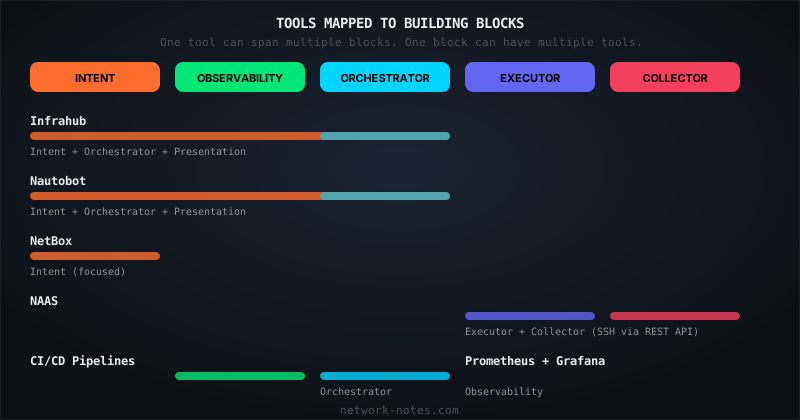
One tool can fill multiple blocks. Nautobot, for example, covers Intent (it’s a source of truth), Orchestrator (its Jobs framework coordinates workflows), and Presentation (it has a web UI and API). That’s fine. The framework doesn’t prescribe how many tools you use. What matters is that the functions are covered.
Conversely, one block might need multiple tools. Your Collector might be Telegraf for metrics, a streaming telemetry receiver for gNMI, and a custom script for legacy SNMP devices. Three tools, one function.
This is why starting with tools fails. If you pick Ansible because someone on the team knows it, you’ve filled part of the Executor block and maybe part of the Orchestrator block. But you haven’t thought about Intent, Observability, or how the pieces connect. Six months later you’re writing a wrapper script that queries a spreadsheet (your accidental Intent block) and pipes it into an Ansible playbook (your Executor), with no Observability, no Collector feeding back actual state, and no Orchestrator handling failures.
The framework makes these gaps visible before you start building.
Mapping Real Tools
Here’s how I map tools I’ve used to the framework. This isn’t exhaustive. It’s meant to show how the mental model works in practice.
Intent
The Intent block is where most network automation projects should start, because everything downstream depends on having reliable desired-state data.
Three platforms dominate this space right now: NetBox, Nautobot, and Infrahub. All three serve as network sources of truth. All three expose APIs for automation to consume. They differ in architecture, schema flexibility, and how far they extend beyond pure data storage, but any of them can fill the Intent block effectively. I’ll have a detailed comparison of all three in a forthcoming post.
My preference is Infrahub, and I should be transparent about why: I was Director of Product at OpsMill during its development, and I worked with several of the NAF Framework contributors at Network to Code before that. It’s schema-first with a versioned graph database, and it reaches into Orchestrator territory (CI/CD integration, proposed changes with approval workflows) and Presentation (web UI, GraphQL API). Having built automation systems with all three platforms, I think Infrahub covers more of the Intent block’s requirements in a single platform than the alternatives do today.
That said, NetBox has the largest community and plugin ecosystem by a wide margin, and Nautobot extends further into Orchestrator (its Jobs framework) and Presentation than NetBox does. Both are proven at scale in ways that Infrahub, being newer, is still proving.
Large operators often run internal platforms that serve the same Intent function. They store desired state for network infrastructure and expose it through APIs that automation consumes. The tools are different, but the function is identical.
Executor and Collector
These are the transport layer, the blocks that actually touch your network devices.
NAAS (Netmiko-as-a-Service) is a project I maintain that wraps Netmiko behind a REST API. It handles both read and write operations: you POST a command or configuration payload, NAAS manages the SSH session, and returns structured results. It fills both the Executor block (config pushes, device operations) and the Collector block (show commands, state retrieval).
Wrapping device interaction in a service means your Orchestrator doesn’t need to know how to SSH into a Juniper vs. an Arista. It just calls an API. The transport complexity is encapsulated in one place.
Other tools that fill these blocks: Nornir (Python-native, multi-threaded), Ansible (push-mode config management), NAPALM (multi-vendor abstraction), and for collection specifically, Telegraf, streaming telemetry receivers, or SNMP-based collectors.
Orchestrator
This is where workflows live. CI/CD pipelines (GitHub Actions, GitLab CI, Jenkins) are the most common Orchestrator in practice. They respond to events (a merge to main), coordinate steps (validate, generate config, deploy, verify), and handle failures.
Nautobot Jobs serve this function within the Nautobot ecosystem. Tools like Prefect, Temporal, or Apache Airflow work here too, especially for complex multi-step workflows with retry logic and rollback.
In my experience, you almost always end up with a dedicated orchestration platform at scale because the coordination logic gets complex enough to warrant its own system.
Observability
Prometheus and Grafana are the default answer for metrics. Elasticsearch or Loki for logs. For network-specific observability, tools like Suzieq or Batfish provide deeper network state analysis.
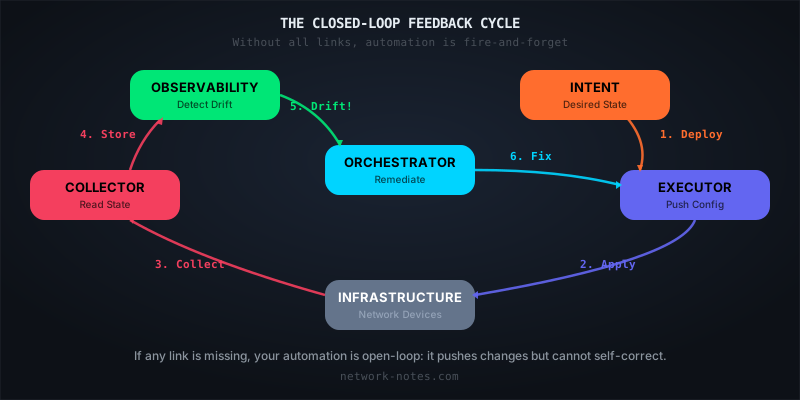
The key requirement from the framework: Observability should generate events when actual state diverges from intended state. That feedback loop (Collector reads state, Observability detects drift, Orchestrator triggers remediation via Executor) is where automation becomes closed-loop rather than fire-and-forget. People are starting to teach this. At AutoCon5, NetBox Labs ran a hands-on workshop called “Self-Healing Networks” that built exactly this loop: source of truth → deploy → detect drift → auto-remediate.
Presentation
ServiceNow, Slack bots, custom dashboards, CLI tools, API gateways. This block is the most organization-specific because it depends entirely on how your users (network engineers, NOC staff, other teams requesting changes) prefer to interact with the system.
How to Use This
If you’re starting a new automation project, use the framework as a checklist:
Identify which blocks you need first. Not every project needs all six functional blocks on day one. If your immediate pain is “we don’t know what the network should look like,” start with Intent. If it’s “we can’t deploy changes reliably,” start with Executor.
Audit your existing stack. Map every tool you currently use to a block. You’ll likely find gaps (no Observability feeding back to Intent) and overlaps (three different tools all partially filling Orchestrator, none of them well).
Evaluate new tools against the framework. When someone pitches you a product, ask: “Which block does this fill? Do I already have something there? Does it compose with what I have in adjacent blocks?”
Look for the missing feedback loops. The framework’s read/write symmetry implies closed loops: Intent defines desired state, Executor pushes it, Collector reads actual state, Observability compares them, Orchestrator remediates drift. If any link in that chain is missing, your automation is open-loop. It pushes changes but can’t verify or correct them.
The framework won’t build anything for you. But it gives you a shared language for talking about what you’re building and a way to spot what’s missing before you’re six months into a project that can’t close the loop.
In February, Wim Henderickx and Damien Garros presented “The Network Automation Map” at NANOG 96, introducing the framework to the North American operator community. By April, it had spread to European NOGs: Christian Adell and Damien Garros at ITNOG 10 in Bologna, Pete Crocker at ESNOG 35 in Madrid. Damien Garros did an episode of Packet Pushers’ Total Network Operations on the same theme.
Then in June, it went from conference talk to conference track. At AutoCon5 in Munich (June 8–12, 2026), the NAF Framework got its own half-day dedicated track, the first time in Europe. Damien Garros and Christian Adell did a deep dive, Claudia de Luna walked through a real use case, and Christian Drefke from Bechtle presented on applying the framework to actual customer projects. 700+ engineers attended the event overall.
A couple weeks earlier, Jeff Doyle keynoted CHI-NOG 13 (May 28, Chicago), presenting the framework to a regional operator audience and making a point I agree with: “single source of truth” is still the right term for what the Intent block provides. “Model-driven” tells you about the implementation. “Intent-based” tells you about the interface. Neither tells you about the property we actually want: that there is one place where the answer to “what is the network supposed to look like” lives, and everything else derives from it.
It’s no longer just a slide deck. People are using it to structure real projects, and AutoCon6 in Tucson (November 2026) is next.
The full framework documentation is at reference.networkautomation.forum. The community discussion happens in the NAF Slack.