
CiSSHGo: A Lightweight SSH Device Emulator for Network Automation Testing
Table of Contents
You need to test your network automation code. You’ve got an Ansible playbook that configures interfaces across a thousand switches, or a Nornir script that collects show version from every device in your inventory, and you need to know it works before it hits production.
The standard answer is “spin up a lab.” CML, EVE-NG, GNS3, ContainerLab — all solid tools that run actual NOS images. They give you real device behavior, real protocol interactions, real forwarding planes. They’re also heavy. A single Cisco CSR1000v image wants 4GB of RAM. Multiply that by the number of devices in your test topology and you’re looking at serious compute just to validate that your automation sends the right commands and parses the output correctly.
For a lot of automation testing, you don’t need a real forwarding plane. You need something that accepts an SSH connection, presents a prompt, and responds to show version with the right output. That’s what CiSSHGo does.
What CiSSHGo Is (and Isn’t)
CiSSHGo is a single Go binary that spawns SSH listeners, each emulating a network device by playing back pre-defined command transcripts. You define what commands a device supports and what output it returns, and CiSSHGo handles the SSH session, prompt rendering, command matching, and context transitions (> → # → (config)# → (config-if)#).
It is not a network simulator. There’s no forwarding plane, no routing protocol adjacencies, no MAC address table. It doesn’t run IOS or EOS or Junos. It plays back text files. That constraint is also its strength: a single CiSSHGo process can spawn thousands of SSH listeners using Go’s goroutine-per-listener model, each consuming a few kilobytes of memory. Try that with a Python-based mock server or a fleet of virtual routers.
If you’re thinking “why not ContainerLab?” — different tool for a different job. ContainerLab runs real NOS images in containers, which gives you protocol adjacencies and a real forwarding plane at the cost of per-device resource overhead. CiSSHGo gives you SSH session fidelity at massive scale with near-zero overhead. FakeNOS is the closest analog — same concept, Python-based. CiSSHGo’s Go runtime gives it an edge on concurrency and memory when you’re scaling to thousands of listeners.
CiSSHGo isn’t new. Tony Nealon (tbotnz, also the creator of netpalm) first published it in August 2020, and it’s been in active use since. I’ve been a contributor and have used it as the SSH mock backend in my own projects. What is new is the scope of recent work: the project went from a single-platform proof of concept to a v1.0.0 stable release in March 2026 with multi-vendor support, an inventory system, scenario mode, and proper release engineering. That’s enough of a capability jump to warrant a re-introduction for anyone who hasn’t looked at it recently. It’s MIT licensed, ships as pre-built binaries for Linux/macOS/Windows (amd64 and arm64), and publishes multi-arch Docker images to GitHub Container Registry.
Capabilities
Seven Platforms Out of the Box
CiSSHGo ships with transcript libraries for seven platforms: Cisco CSR1000v, IOS, IOS-XR, ASA, NX-OS, Arista EOS, and Juniper Junos. Each platform comes with show version, show ip interface brief (or equivalent), and show running-config transcripts sourced from NTC Templates test fixtures.
The transcript map is a YAML file that defines everything about a platform — hostname, credentials, supported commands, context hierarchy, and prompt format:
| |
Adding a new platform or new commands is just adding text files and YAML entries. No Go code required.
Inventory Mode
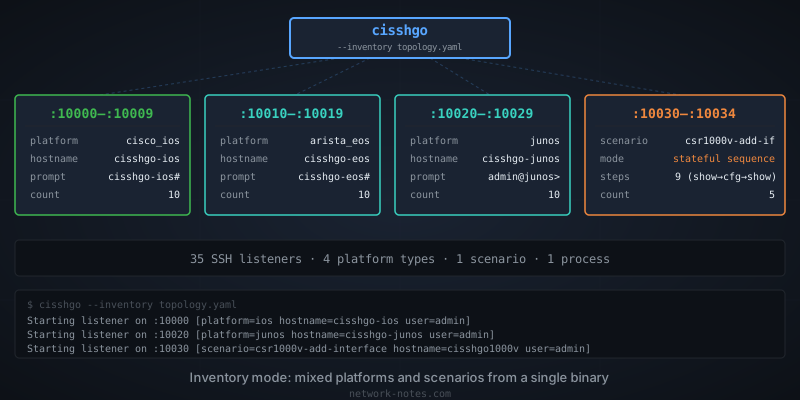
For testing against multiple device types, CiSSHGo supports an inventory file that spawns different platforms on different ports from a single process:
| |
One binary, 50 SSH listeners, five different platform personalities. Each gets its own hostname, credentials, prompt style, and command set.
Scenario Mode
Scenario mode is the feature that moved CiSSHGo from “useful for smoke tests” to “useful for real integration testing.” A scenario defines an ordered sequence of commands with different outputs at each step. The classic use case: show running-config returns one output before a configuration change and different output after.
| |
Each SSH session gets its own sequence pointer. Commands that don’t match the current step fall through to the platform’s normal command set. Scenario mode also handles interface abbreviation matching — int g0/0/2 matches interface GigabitEthernet0/0/2 without a hardcoded abbreviation table. The sequence step itself provides the ground truth.
Flexible Prompts
Not every NOS uses the Cisco hostname# prompt format. CiSSHGo supports a prompt_format field for platforms like Junos that use user@hostname> style prompts, and context_prefix_lines for multi-line prompts like Junos’s [edit] prefix:
| |
This produces:
| |
Session Behavior
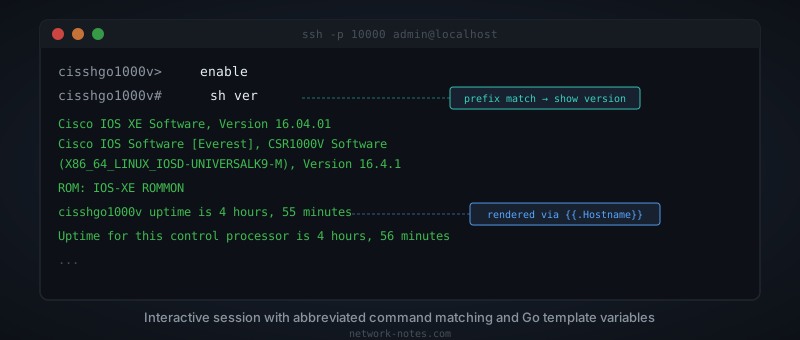
Once a listener is running, CiSSHGo handles the session the way you’d expect from a real device. Commands are matched by prefix — sh ver resolves to show version, sh ip int br to show ip interface brief — and ambiguous abbreviations get the familiar % Ambiguous command error. Your automation code can use the same shortened commands it uses against real hardware.
Both interactive shell sessions and exec mode (ssh host "show version") work. Automation tools like Ansible’s network_cli use interactive shell mode, while libraries like Go’s x/crypto/ssh and Paramiko’s exec_command() use exec mode — so supporting both matters for realistic testing.
Transcript files support Go’s text/template syntax. You can reference device fields like {{.Hostname}} in your transcript output, so the same transcript file produces different output for different devices in an inventory.
Running It
The quickest path is Docker:
| |
That gives you 50 listeners on ports 10000–10049, all emulating a CSR1000v by default. Pre-built binaries are on the releases page if you’d rather run it directly.
Every CLI flag has a corresponding environment variable (CISSHGO_LISTENERS, CISSHGO_STARTING_PORT, CISSHGO_TRANSCRIPT_MAP, CISSHGO_PLATFORM, CISSHGO_INVENTORY), so it drops into a docker-compose or Kubernetes manifest without wrapper scripts.
Where It Fits
Scale Testing
This is where CiSSHGo’s Go runtime earns its keep. If you’re building or evaluating a network automation framework that needs to handle thousands of devices, you need thousands of SSH endpoints to test against. You don’t need those endpoints to actually route packets — you need them to accept connections, authenticate, and return plausible output.
A single CiSSHGo process with --listeners 10000 spawns ten thousand SSH listeners, each running as a goroutine. Memory overhead is measured in megabytes, not gigabytes. Compare that to spinning up ten thousand virtual routers (not happening), ten thousand containers running a Python SSH server (possible but expensive), or trying to test at scale against a lab of 20 real devices and hoping the math extrapolates (it won’t — connection pooling, queue depth, and timeout behavior all change at scale).
Pair CiSSHGo with an inventory file and you get a mixed-vendor topology: a few thousand IOS devices, a few thousand NX-OS, some EOS, some Junos. Your automation framework sees what looks like a heterogeneous production network. The responses are canned, the SSH handshakes and authentication are real, and that’s exactly the layer you’re trying to test.
CI/CD Pipeline Testing
The simplest use case. Drop CiSSHGo into your CI pipeline as a service container, point your automation tests at it, and validate that your code sends the right commands and parses the output correctly. No lab infrastructure to maintain, no NOS licenses to manage, no flaky device VMs timing out mid-test.
A docker-compose snippet for a GitHub Actions workflow:
| |
Your test suite connects to localhost:10022, runs commands, and asserts on the output. The CiSSHGo container starts in under a second.
Integration Test Stacks
I use CiSSHGo as the mock SSH backend in the integration test suite for NAAS (Netmiko As A Service). The docker-compose stack spins up CiSSHGo alongside the API server, workers, and Redis, and the tests exercise the full request path: HTTP request → job queue → Netmiko SSH connection to CiSSHGo → response parsing → result delivery. The CiSSHGo container handles send_command, send_config, structured output parsing, platform autodetect, and authentication failure scenarios. I’ll cover that setup in detail in a future post.
Parser Development
If you’re writing or testing TextFSM or TTP templates — something I’ve written about before — you need consistent, known-good command output to parse against. CiSSHGo’s transcripts are sourced from NTC Templates test fixtures, so you get realistic output that matches what the parsing community already validates against. Point your parser at CiSSHGo, iterate on your template, and know that the input is stable between runs.
It also works for demos and training — a multi-vendor topology from a single container, no lab required. Students can SSH in and practice writing playbooks against something that responds like a real switch.
When Not to Use It
- No protocol simulation. If your tests depend on BGP adjacencies forming, OSPF routes being installed, or ARP tables populating, CiSSHGo can’t help. You need CML, ContainerLab, or real hardware.
- No NETCONF, gNMI, or SNMP. CiSSHGo is SSH-only. If your automation uses model-driven interfaces, look elsewhere.
- No dynamic state beyond scenarios. Outside of scenario mode, every session gets the same output for the same command. There’s no simulated interface going up or down, no counter incrementing. Scenario mode adds ordered state changes, but it’s scripted, not reactive.
- Transcript maintenance. Your transcripts need to match what your automation expects. If a real device’s
show versionoutput changes between NOS versions and your parser depends on the new format, you need to update the transcript. This is manageable but not zero-effort.
CiSSHGo tests your automation’s SSH interaction layer — connection handling, command dispatch, output parsing, error handling. It doesn’t test whether your automation produces correct network state. A playbook that configures BGP neighbors needs a real lab (or at minimum ContainerLab) to validate that adjacencies form and routes propagate. And no amount of pre-production testing — mock or otherwise — replaces a sensible rollout strategy: canary deployments, staged rollouts, automated validation gates. CiSSHGo fits early in that pipeline, catching the class of bugs that don’t need a forwarding plane to find. The rest of the pipeline still matters. I’ll dig into automation testing strategies and deployment patterns in a future post.
Getting Started
The GitHub repo has pre-built binaries on the releases page, Docker images on GHCR, and documentation covering configuration, transcript authoring, and the inventory system. The project is MIT licensed and accepts contributions — the CONTRIBUTING.md covers the workflow.
If you’re testing network automation against real devices or heavyweight simulators and finding it slow, flaky, or expensive to maintain — stop. Use CiSSHGo for the SSH interaction layer, save the real lab for the tests that actually need a forwarding plane.